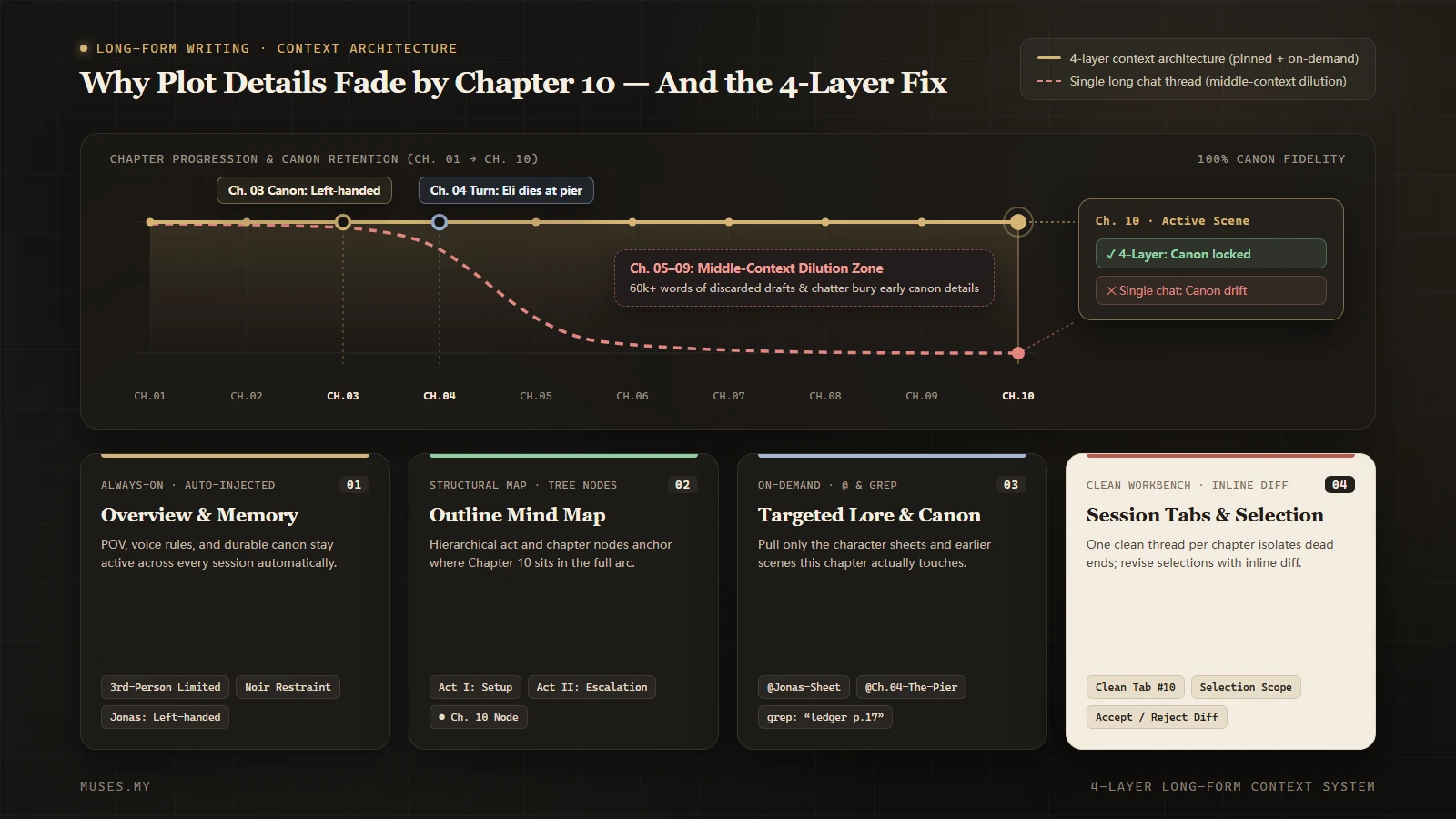
Why AI Forgets Your Plot by Chapter 10 (And How to Manage Long-Form Context)
In chapters one through five, the AI remembers every detail. By chapter ten, your left-handed detective uses his right hand and a dead character walks back into the room. Here is why long chat threads lose your plot — and a four-layer structure to keep a book consistent.
For the first five chapters, you feel like you have found the ideal co-writer. The AI remembers that Jonas speaks in short sentences and uses his left hand, that the harbor town has been under rain for three days, and that the informant, Eli, died at the pier at the end of Chapter 4.
By Chapter 10, the thread is eighty messages long. You ask it to draft a tense scene in the apartment kitchen. Seconds later, the prose arrives: Jonas reaches for the bread knife with his right hand, and Mara suggests calling Eli to check the cargo manifest.
You stop and correct it in the chat: "Jonas is left-handed, and Eli died in Chapter 4." It apologizes and rewrites the scene. Two chapters later, it turns Mara's sister into her cousin. Frustrated, you close the sluggish thread and open a fresh chat — only to stare at an empty input box, realizing you now have to dig through fifteen thousand words of character sheets, worldbuilding notes, and chapter summaries just to paste enough context to write the first sentence of Chapter 10.
Almost everyone who writes long-form fiction or nonfiction in ChatGPT or Claude hits this wall somewhere between Chapter 8 and Chapter 12.
Transparency note: We build Muses, a writing workspace that puts AI chat inside the editor. This post is written by the team, and every claim about the product maps to what it does today.
The short version
- A bigger context window does not guarantee a consistent book. Window size is a capacity ceiling, not an attention guarantee; as a thread grows, early details buried in the middle lose weight.
- Writing an entire book in one chat thread pollutes canon with discarded drafts. Cut scenes, rejected plot branches, and three versions of Chapter 7 sit beside your final prose, and the model cannot tell which version won.
- Consistency comes from separating your archive from your workbench. Finished chapters, character sheets, and outlines belong outside the conversation; a chat thread should handle the scene in front of you.
- Long-form context works best in four layers. An always-on overview, a structural map, an on-demand reference archive, and a clean workbench for the current passage.
- When the AI lives inside your project, you stop acting as its courier. It can search earlier chapters, read materials and mind maps, and maintain layered project memory without you re-pasting the book into every new thread.
Why a longer chat makes the model forget more
It is easy to assume the AI forgets because you ran out of tokens. In practice, even when a model advertises a 200,000- or 1,000,000-token context window, continuity errors still show up right around Chapter 10 if you keep piling everything into one endless conversation. Four things are happening underneath:
One: attention drops in the middle of a long thread. Language models pay the sharpest attention to the very beginning of the context and the most recent turns. A single sentence mentioned forty turns ago — "his right wrist never healed properly, so he uses his left hand" — sits in the low-attention valley in the middle of the prompt. Unless something brings that detail back into focus for the current turn, the model defaults to the statistical habit of ordinary prose: people reach with their right hand.
Two: rejected drafts drown out what you actually kept. Long-form writing is full of dead ends. In Chapter 4, you may have spent five turns exploring whether Eli should fake his death before deciding to kill him off for good. In Chapter 7, you may have tried three different endings. Inside a single chat thread, every rejected branch remains in the transcript. The model is not reading a clean manuscript; it is reading a room full of conflicting notes.
Three: sliding windows and background summaries quietly drop setup details. As a conversation stretches on, chat tools manage latency and token budgets by trimming older turns or summarizing earlier parts of the thread. Summaries preserve plot headlines ("Chapter 4: confrontation at the pier, Jonas recovers the ledger") and strip away physical specifics ("page 17 is torn out," "the pocket watch stopped at 3:15"). Once a setup detail disappears from the summary, the payoff disappears with it.
Four: opening a new chat resets the world to zero. When a thread becomes too muddled to trust, you click New Chat. Now the noise is gone — and so is your book. You are back to hunting through folders and old conversations to assemble a briefing packet by hand before you can get back to the sentence you wanted to write.
Stop using one giant thread: the four-layer context structure
Keeping a book consistent through Chapter 30 does not require a single chat thread that holds a million words. It requires splitting context by how often it changes and when the scene actually needs it.
A durable long-form setup separates context into four layers:
| Layer | What belongs here | How often it changes | When the AI should see it |
|---|---|---|---|
| 1. Always-on baseline (Overview & rules) | Narrative POV, tense, style rules, core premise, one-line character roles, current progress | Rarely; updated when major milestones shift | Injected at the start of every new conversation (kept tight: 500–1,000 words) |
| 2. Structural map (Outline & beats) | Chapter-by-chapter outline, character web, where major setups are planted and paid off | Updated when plot structure changes | Consulted when planning a chapter, checking pacing, or verifying cause and effect |
| 3. On-demand archive (Characters, lore & finished chapters) | Full character sheets, locations, glossary, research notes, saved chapter text | Grows steadily as the manuscript advances | Pulled in only when the current scene touches that character, place, or earlier chapter |
| 4. Active workbench (Current scene & selection) | The chapter open on screen, the paragraph selected under your cursor, the goal for this pass | Every few minutes | Handled in a clean, focused thread and reviewed directly on the page |
This structure resolves the core tension of long-form AI writing: the model needs your global rules every time (Layer 1), needs exact facts from Chapter 3 when relevant (Layer 3), and needs a quiet workbench free of fifty pages of unrelated chatter when tightening a paragraph in Chapter 10 (Layer 4).
How those four layers work inside Muses
In a standalone chat window paired with Word or Google Docs, you have to maintain those four layers yourself with folders and copy-paste. In Muses, the workspace is built around them: your project and materials sit on the left, the manuscript or mind map in the middle, and AI chat on the right.
Layer 1: Layered persistent memory (User Memory, Project Overview, and Project Details)
Instead of dumping raw chat history into every prompt, Muses structures persistent memory into three parts:
- User Memory: cross-project preferences that stay with you — your preferred prose rhythm, language, formatting habits, and stylistic rules.
- Project Overview: the always-on baseline for this specific book — premise, narrative perspective, core cast, project rules, and where the draft stands.
- Project Details: separate, titled notes for specific topics inside the project (such as a subplot timeline or faction rules), which can also link to specific articles or materials and be created, patched, or archived as the book evolves.
When you start a new chat conversation in a project, your User Memory and Project Overview are injected automatically on the first turn, so the AI starts with the book's baseline without you pasting a preamble. During the conversation, the AI can search (grep) or read and commit (memory) Project Details whenever a scene calls for them. In-editor completion and dictation also draw from User Memory, the Project Overview, and active Project Details linked to the current document.
Whenever you want to check what the AI knows, open View Memory in the editor to read your User Memory, Project Overview, and active Project Details. If a plot decision changes, tell the AI in chat or switch to the Memory Refresh work mode to have it review and reorganize your memories against the project.
Layers 2 and 3: Articles, materials, and mind maps inside one project boundary
Your manuscript chapters (articles), reference materials (material library articles, txt / md / docx files, PDFs, web links, and images), and outlines (mind maps) all live inside the same project:
- Point to the exact files a scene needs with
@. When drafting the kitchen argument in Chapter 10, type@in the chat input box to attach Jonas — Character Sheet and Chapter 4: The Pier (up to 5 articles or materials per message) without leaving the editor. - Let the AI search the manuscript before it writes. If you cannot remember which chapter mentioned the missing ledger page or how a minor character spelled her name, ask the AI to look it up. Its
greptool searches across the project's saved articles, materials (including material articles, text files, URLs, PDF summaries, and mind map node topics), and memories, and itsreadtool reads the exact blocks or lines it needs. - Keep outlines and prose connected. The AI can read your project's mind maps as structured outlines with node anchors. When it proposes changes to an existing mind map, those edits are marked node by node on the canvas for you to accept or reject before anything is written.
Layer 4: Multi-session tabs, selection context, and in-place diff review
To keep a single thread from turning into an eighty-message swamp, Muses includes a multi-session chat workspace on both web and desktop:
- Separate tabs for separate jobs. Open a second conversation in the chat panel and session tabs, a new-chat button, and session history appear at the top. You can keep one tab open for stress-testing the Act II outline and open a fresh tab for polishing dialogue in Chapter 10 — so discarded brainstorming never leaks into your prose edits.
- Select on the page, review in place. Highlight the three paragraphs you want to tighten; the selection travels with your message automatically. When the AI edits an existing article, the revision does not overwrite your draft. It lands on the original sentences as inline deletions and additions: if the AI ever tries to change "left hand" to "right hand," you see the red strikethrough on the page and click Reject on that item while accepting the rest. Right after accepting, you can undo the accepted revision in one click (until you continue editing the text). On the desktop app, local projects use the same side-by-side chat, project tools, and inline review flow when signed in and online.
Four habits that help today — even in a regular chat window
Even if you are writing in a standard ChatGPT or Claude window today, you can cut Chapter 10 continuity errors immediately with four habits:
One: never treat a chat thread as your source of truth
A chat window is scratch paper; your manuscript and reference files are the only canon. As soon as you settle on a plot turn or character detail in chat, move it into your outline or character sheet and update the old entry. Never expect the model to infer which of three brainstormed options you secretly decided to keep thirty messages ago.
Two: write a 150-word "Chapter Handover Card" each time you finish a chapter
Do not paste nine full chapters into the prompt for Chapter 10, and do not rely on a vague one-liner like "Chapter 9: Jonas and Mara argue." When a chapter is finished, spend two minutes writing a short card that records what changed in the physical and narrative state:
[Chapter 9 Handover Card]
- Time & place: Thursday, 11:40 PM, Jonas's apartment kitchen in the old harbor (rain just stopped)
- Present on scene: Jonas (old right-wrist injury, always uses his left hand; coat still wet from the pier); Mara (standing by the window with her back to him)
- Irreversible facts: Informant Eli died at the pier in Ch. 4; torn page 17 of the ledger is in Mara's coat pocket (Jonas does not know yet)
- Immediate hook: An unlit gray car just rolled past below; Mara is counting the seconds, waiting for Jonas to speak first
In a hundred words, that card locks down physical positions, physical traits, who is alive, and who knows what — the exact four things a model is most likely to hallucinate.
Three: start a fresh thread for each chapter, and pack only what enters the room
Open a clean conversation for each new chapter (or each major scene) and include only three things in your opening brief:
- Your 500-word book baseline (voice rules + core premise);
- Character notes only for the characters who appear in this scene (leave out subplots and cast members who are not in the room);
- The 150-word handover card from the previous chapter, plus the three beats this chapter needs to hit.
A lean, relevant prompt beats a bloated transcript every time.
Four: when the AI contradicts canon, fix the prompt instead of arguing in the thread
When the AI writes "Jonas reached with his right hand" or brings a dead character back into the room, the natural impulse is to reply: "Wrong! He is left-handed, try again!"
Doing that once is fine. Doing it three times fills the thread with the mistake, the apology, and the bad draft — keeping the wrong words active in the recent context. Instead, add the missing constraint directly to your previous prompt and regenerate from there, so the wrong timeline never stays in the conversation history.
The bottom line
When AI starts "forgetting" your book around Chapter 10, the model has not suddenly gotten worse. A linear chat thread was simply never designed to hold a whole book. Stack worldbuilding, cut scenes, outlines, and ten chapters of prose into one scrolling transcript, and any model will eventually drown in the noise.
Splitting your context into four layers — an always-on overview, a structural map, an on-demand reference archive, and a clean workbench for the current scene — gives a long project its spine back. What must always hold stays in memory and overview; what needs checking gets pulled from materials and earlier chapters on demand; what is being written right now stays in a focused session with inline review.
That is how Muses is built: User Memory, Project Overview, and Project Details maintained in layers; articles, materials, and mind maps sharing one project boundary; @ mentions and project-wide search when you need earlier chapters; multi-session tabs to keep outlining separate from line editing; and inline diff review on every change to existing prose. To try it on your own manuscript, start a project, or explore how the novel writing workspace and AI novel writer handle long-form projects. If you are also tired of ferrying drafts between windows, continue with The copy-paste tax: what writing in ChatGPT and Claude actually costs and How to Write a Book With AI: An 8-Step Process That Keeps Your Voice.
Starting is free: the Free plan includes the default Clio model and 50,000 StarPower a month; paid plans are billed by subscription, with current prices on the checkout page. Start free.
Frequently asked questions
Why does AI forget plot details even with a huge context window?
A context window measures how much text a model can accept at once, not how evenly it pays attention across that text. When a single chat thread holds dozens of rejected drafts, tangents, and chapters, early details buried in the middle lose weight to recent messages or get dropped when the thread is summarized.
Should I write a whole book inside one continuous chat thread?
No. The longer a single thread runs, the more rejected ideas and outdated versions accumulate inside it, making it harder for the model to tell final canon from discarded drafts. Keep your canon outside the conversation and open clean threads for each chapter or task.
Do I have to re-paste my character sheets and earlier chapters every time I start a new chat?
In a standalone chat window, you usually have to assemble and paste that brief by hand. When the AI works inside your writing project, it can search and read your chapters, materials, mind maps, and persistent memory directly, and you can reference specific files with @.
How does persistent memory work for long-form projects in Muses?
Muses organizes persistent memory into cross-project User Memory, a Project Overview for the current book, and topic-specific Project Details. When a new chat starts, User Memory and the Project Overview are injected automatically, while the AI can search, read, and update Project Details on demand.
Can I see what the AI has remembered about my book?
Yes. Open View Memory in the editor to inspect your User Memory, Project Overview, and active Project Details. When something changes, tell the AI in chat or switch to the Memory Refresh work mode to have it reorganize your memories.
Can I keep separate chats for outlining and editing in the same project?
Yes. On the web and desktop apps, the chat panel supports multiple session tabs within the same project, so you can brainstorm plot structure in one tab and line-edit a chapter in another without mixing contexts.
Are project search, @ mentions, and persistent memory included on the free plan?
Yes. The Free plan includes the default Clio model and 50,000 StarPower a month, with access to project articles, materials, mind maps, @ mentions, and persistent memory; advanced models, voice, and image generation have their own limits or tiers.