How to Write a Book With AI: An 8-Step Process That Keeps Your Voice
A practical 8-step workflow for writing a book with AI — copyable prompts, a revision checklist, and the decisions that should stay yours.
You have an idea for a book. Maybe you have a few chapters. What you want to know is how to use AI without ending up with a manuscript that reads like every other AI-assisted book: smooth, competent, and not quite yours.
The short answer: AI can help at almost every stage, from sharpening the premise to finding the character who is left-handed in chapter 3 and right-handed in chapter 14. The sentences that end up in the book should still be yours. “Writing a book with AI” should mean writing your book with AI, not letting AI write a book.
This guide gives you an eight-step workflow, copyable prompts, and a clear line between what AI can do and what has to stay with you. The examples are from a novel; if you are writing nonfiction, the same steps apply with sources and arguments in place of characters and worldbuilding. There is a section on that at the end.
Transparency note: We build Muses, a writing environment for working with AI. This guide is written by the team, and every claim about the product maps to what it does today.
The short version
- AI is most useful for asking questions, checking consistency, and revising small units. It is least useful for generating whole chapters.
- A book is a project, not a chat. Character sheets, worldbuilding, and an outline need to live somewhere the AI can look them up.
- Never let an AI change enter your manuscript unreviewed. Read every suggested edit.
- Your voice comes from the passages you write and the decisions you make. Delegate the questioning; keep the choosing.
- Copyright and disclosure rules depend on where you publish. Keep a record of how you used AI, and check the current guidance before you submit.
Can AI write a whole book?
Technically, yes. A current language model can produce enough words for a novel in an afternoon. A book that someone finishes reading is much rarer. Three problems show up almost immediately.
The average tone. Without constraints, a model writes a pleasant average: sentences of similar length, familiar images, characters who explain their feelings instead of showing them. It is choosing a likely next sentence, and likely is what has been written a thousand times before.
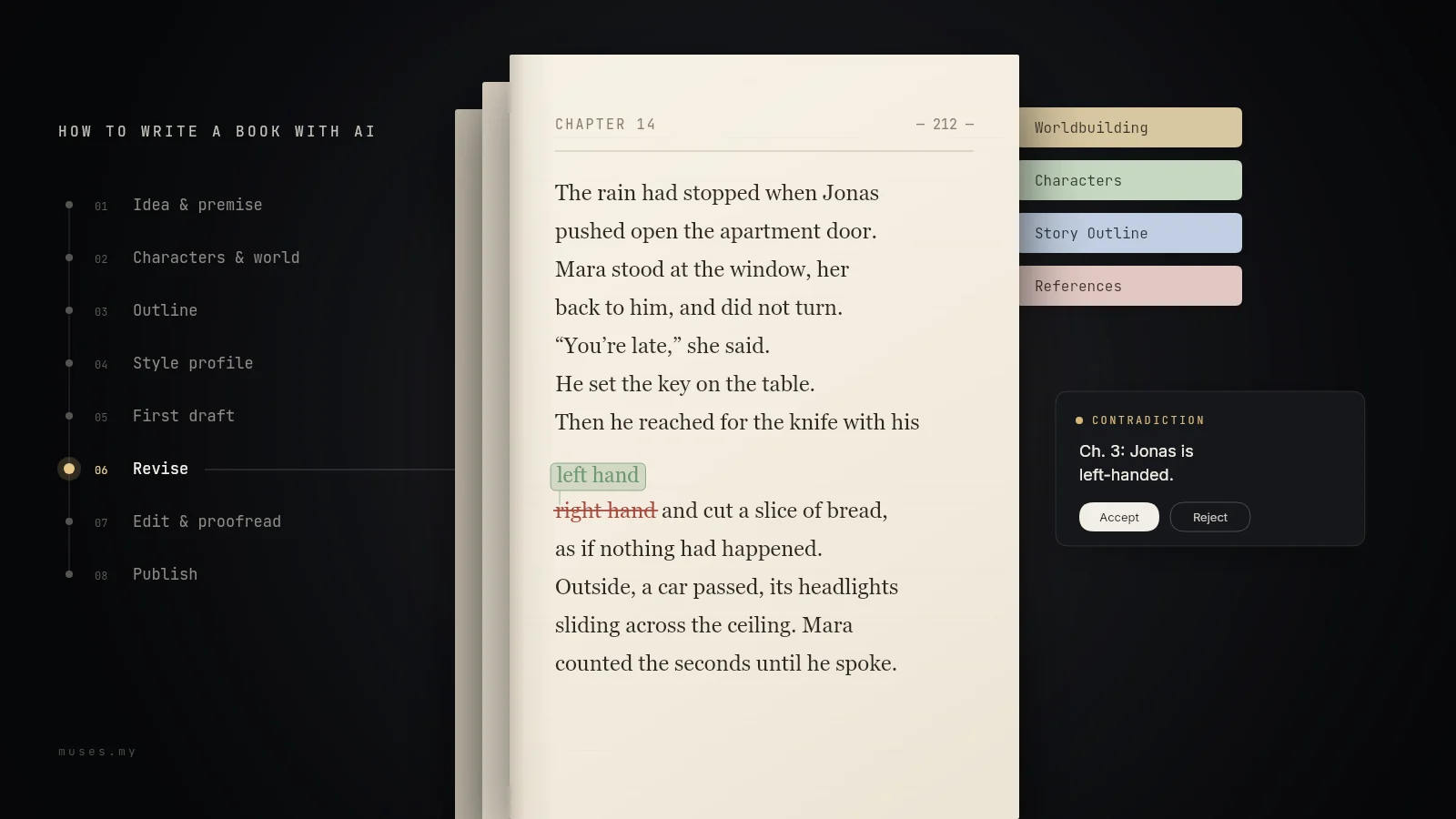
Contradictions across chapters. In chapter 3 Jonas is left-handed; in chapter 14 he reaches for the knife with his right hand. A model only works with the text in front of it. In a long chat, earlier details fall out of view or get summarized. Even a large context window does not solve this: models use information in the middle of a long text less reliably than information at the beginning or end, a pattern researchers call “lost in the middle”. The common advice to write a whole book in one chat thread makes it worse, because valid and discarded versions sit side by side and the model has no way to know which one still counts.
Invented facts. Models state false things as confidently as true ones. In a novel this can show up in historical details or legal procedure. In nonfiction it hits the core: numbers, quotes, and studies that sound plausible and do not exist.
Then there are copyright and platform rules, which we will get to in step 8. The useful question is not “Can AI write a book?” but “How do I use AI so the book gets better and stays mine?” The answer is a workflow, not a prompt trick.
The eight steps at a glance
| Step | What AI helps with | What stays with you |
|---|---|---|
| 1. Idea and premise | Asking hard questions; finding gaps in conflict and ending | What the book is about; the premise itself |
| 2. Characters and world | Finding contradictions and open questions | Inventing the characters; setting the rules |
| 3. Outline | Testing the chapter plan; marking sagging sections | The order of events; what to leave out |
| 4. Style profile | Describing your voice as rules | What actually makes your tone yours |
| 5. First draft | Unblocking scenes; drafting from your beats | The sentences that end up in the book |
| 6. Revision | Searching the manuscript; proposing targeted changes | Every decision to accept or reject |
| 7. Editing and proofreading | First-reader reactions; catching typos | Human editing, proofreading, test readers |
| 8. Publishing | Blurb bullets; checklists | Rights, disclosure, platform rules |
The right-hand column is not a disclaimer. It is the reason the workflow works. Where AI adds nothing, leave it out.
Step 1: Sharpen the idea and write the premise
Most books do not begin with a finished plot. They begin with an image, a character, a question. Do not ask AI for ten plot variants on day one; you will lose track of which idea was yours. Use it as a persistent questioner instead.
I'm writing a novel. My premise in three sentences: [your premise]. Don't write plot for me. Ask me ten questions an editor would ask before reading on: about the protagonist's goal and fear, the antagonist, what is at stake, and the ending. Mark the three most important.
Answer the questions yourself. By the fourth one you will often know whether the idea carries a book or a short story. If you do want options later — a title, a turn — ask for twenty, not three; the first ones are almost always the obvious ones.
Turn your answers into a premise: one or two pages on the theme, the main characters, the conflict, and the ending. Write it yourself, then ask AI to check it:
Mark where the conflict, the turning points, or the ending are still unclear. Don't rewrite anything.
Without that last sentence, you will often get a polished new version that sounds smoother and less like you.
What stays with you: the decision about what the book is about, and the premise itself.
Step 2: Put characters and worldbuilding where the AI can find them
Most guides skip this step. It is the one that decides whether chapter 20 still matches chapter 2. Many contradictions exist because nothing authoritative says what is true.
Make a character sheet for every important character, one page at most:
- Name, age, role in the story
- Appearance and recurring details: eye color, a scar, left-handedness
- Speech: formal or informal, dialect, favorite words
- Goal, fear, secret
- What the character knows, and when they learn it
For worldbuilding, the same idea: places, rules for magic, technology, or society, and terms with a fixed spelling. Add research and sources — the most important part of nonfiction, because a model will invent sources if you let it. Keep everything short, and add new facts the moment they appear in the manuscript.
AI is useful for cleaning up, not inventing:
Which details in this character sheet contradict each other? What is still open about the character's goal and fear? Don't add anything; ask me.
Where these files live matters. In a plain chat, you paste the relevant sheets before every chapter; some chat tools' project features save you part of that. In Muses, you create a project with the Novel category. It starts with four material folders — Worldbuilding, Characters, Story Outline, and References — and in a novel project the AI is designed to read the relevant notes before drafting or revising a chapter, so names, terms, established facts, and the timeline line up better. When a new detail comes up in conversation, it can save it as material instead of pushing it into the chapter text. That does not replace your own read-through, but you stop pasting every character sheet into every request.
What stays with you: the characters themselves. AI can ask whether your protagonist has a weakness. Which weakness is yours to decide.
Step 3: Build and test the outline
Whether you plot ahead or write by the seat of your pants, you need a chapter plan by the time you revise. The AI needs it too, to know what happened before a scene and what has to happen after. If you plot, have the plan checked before you draft. If you discover the story as you write, generate an outline after the first few chapters. AI is more useful as a critical reader than as an idea machine: it finds logic gaps more reliably than it invents good turns.
Here is my chapter outline: [outline]. Read it like an editor. Where does the tension sag? Where does a character act against their own goal without a reason? Which subplot disappears without a resolution? Name the chapter for each. Don't propose new plot unless I ask.
If you have no plan at all, let AI suggest more; an outline is structure, not prose. Treat its suggestions as a discussion draft: cut, reorder, keep what is yours. If you think spatially, build the outline as a mind map with chapters as branches and scenes as leaves. The finished outline belongs with the authoritative files from step 2. Muses has a mind map canvas for exactly this.
What stays with you: the order of events, and what your book leaves out.
Step 4: Capture your voice as a style profile
“Write in my style” only works if the AI knows your style. Give it two or three passages you wrote and ask it to describe, not imitate. The result is a style profile: a short list of rules that apply to every scene.
Below are two passages I wrote. Describe my style as a profile with at most ten rules: sentence length, point of view, tense, dialogue, word choice, and what I avoid. Describe only; don't evaluate. [Passage 1] [Passage 2]
Read the profile critically. AI often gets surface features right — sentence length, tense. It misses what makes your tone yours, like dry humor or deliberate omissions; add those by hand. Store fixed rules such as “first person, present tense, Mara” where the AI will find them next session. And expect it to approximate your style at best.
What stays with you: everything about your tone that does not fit into ten rules.
Step 5: Draft scene by scene
There are two workable ways to draft, and both have a cost.
You write, the AI reads along. You draft, and bring AI in when you are stuck: three possible openings for a scene, a question about what a character really wants, a dialogue that is not working. It is slower, but your voice is there from the first sentence. If you are properly blocked, start with our guide to writer's block rather than asking AI to write the scene for you.
The AI drafts, you rewrite. The AI turns your beats into a rough draft of a single scene, and you rewrite it in your own words. Not edit — rewrite. If you only polish the draft, you have AI text at the core of your book, with consequences for voice and copyright. Even a thoroughly rewritten AI draft may count as AI-generated on some platforms; see step 8.
Whole chapters in one pass rarely work. The longer the generated section, the more filler, repetition, and plot shortcuts. Give beats, point of view, and length every time:
First read the character sheets for Mara and Jonas, the style profile, and the outline for chapter 7. Then draft scene 3 from these beats: [beats]. First person, Mara, present tense, at most 900 words. No summary at the end, no moral, no new subplot. If you are missing information, ask instead of inventing it.
In a plain chat, paste the files under the prompt; in a tool with project access, the AI can open them itself.
After each chapter, write a five-to-ten-sentence summary: what happened, who knows what now, which threads are open. Store it with the outline so the AI can read the current state next time. Also note, in two lines per chapter, where and how AI helped. You will need that in step 8.
In Muses, this is what the workflow looks like: the AI has access to the whole project, not just the chat. It can search every chapter and material by name and term, read character sheets and worldbuilding notes before writing, and change existing text paragraph by paragraph instead of rewriting a whole chapter. It can draft into an empty chapter; review it like any rough draft. Project rules such as tense and point of view can carry across sessions, and you can see, edit, or delete what it remembers at any time. Start a novel project and try it on your next chapter.
What stays with you: the sentences that end up in the book.
Step 6: Revise without losing your voice
Revision is where AI helps most, and where it can do the most damage. The damage usually happens the same way: paste in a whole chapter, ask for an “improvement,” paste the result back. Everything sounds a little smoother and less like you, and nobody knows what changed. A forgotten prompt in a published novel is the extreme version of a common problem.
Revise in passes, from large to small:
- Structure. Does every scene contribute? Where does the tension sag?
- Consistency. Names, ages, places, timelines, and who knows what when. The AI needs access to the whole manuscript; in a plain chat, go chapter by chapter.
- Language. Last, and targeted.
For the consistency pass, list the facts that must not change:
Search all chapters for contradictions with these facts: Jonas is left-handed. Mara's eyes are gray. The apartment is on Linden Street. The story takes place between March and October 2019. For each deviation, name the chapter and the sentence. Don't change anything yet.
“Don't change anything yet” separates finding from fixing. Read every hit yourself; sometimes the character sheet is wrong, not the later chapter. And an empty result list does not prove there are no contradictions.
For the language pass, keep the unit small: one paragraph, one goal. “Make the chapter better” produces a flattened version where your tone disappears. A request at this size looks like:
Revise only the third paragraph. Goal: more pace in the argument, fewer adjectives. Keep the word choice and rhythm of the rest of the scene. Don't change facts or dialogue. Explain each change in half a sentence.
If you are unsure, ask for criticism first, then changes.
Review every change individually. In Muses, AI suggestions on existing text wait in the editor for review: additions and deletions are marked, you accept or reject each one, and your original stays until you confirm. Accepted changes go into version history, so you can return to the version before. How review works. If you want to go deeper on revision as a craft, our guide to getting better at writing breaks the cycle into four passes.
What stays with you: every decision about what to keep.
Step 7: Editing, proofreading, and test readers
Developmental editing looks at content, structure, characters, and style as a whole, and it tells you uncomfortable things. Copyediting handles spelling, grammar, and punctuation. AI can be a first pass at both. It can replace neither.
As a first reader, AI never gets tired. Do not ask “What do you think?” Ask for reactions:
Read chapters 1 to 3 like a test reader. Where does your attention fade? Which character do you not care about?
That does not replace real test readers, but it clears the obvious problems before your manuscript reaches them.
For proofreading, AI catches many typos and inconsistencies, misses some, occasionally introduces new ones, and is not a reliable arbiter of style. Use a dedicated checker for the final pass, and a human proofreader before publication. For a comparison of the different kinds of AI writing tools, see Choosing Your AI Tool.
What stays with you: which advice you take, and the budget for people who read your book professionally.
Step 8: Publish and disclose
In Muses Web, you can export your project as an EPUB: each article becomes a chapter, the order is preserved, and a table of contents is generated automatically. See Exporting & Sharing. For print layout and cover design, use a layout tool or the tools your self-publishing service provides. Check the file requirements of your publishing platform before you upload. AI can supply bullets for the blurb; write the blurb yourself.
Then there are the rules.
Copyright. In the United States and many other jurisdictions, copyright protects human authorship. Material generated purely by a machine, without human creative contribution, may not be protected. The more you write, decide, and revise yourself, the stronger your position. Check the current guidance from your local copyright office; the US Copyright Office keeps its AI materials at copyright.gov/ai. This is not legal advice.
Disclosure. Platforms and publishers increasingly ask how AI was used. Amazon KDP, for example, distinguishes AI-generated content from AI-assisted content and asks you to disclose the former; its content guidelines have the current definitions. Other platforms have their own rules. Traditional publishers often ask you to confirm that you wrote the work; check before you submit. Keep a simple record: which chapters had AI drafts, how much you rewrote, and where AI suggested edits. You will need it for the disclosure form and, if questions arise, for yourself.
The EU AI Act. If you publish text in the EU to inform the public about matters of public interest, the transparency rules in Article 50 may apply. Fiction is generally treated differently from nonfiction, but the details are still being interpreted. If this affects you, read the current text and ask someone qualified.
A pre-publication checklist:
- Keep a record of AI use, chapter by chapter.
- Check your platform's current AI disclosure policy.
- Check your publisher's or agent's submission rules.
- Have a human editor read the final manuscript.
- Verify every fact, quote, and number against the original source.
- Do not publish AI output that reproduces recognizable copyrighted text.
What stays with you: the rights, the disclosure, and the platform rules.
What about nonfiction?
The same eight steps apply, but the weight shifts. Instead of characters and worldbuilding, your expertise and sources carry the book. That is exactly where AI is riskiest, because it invents missing evidence convincingly.
- Outline around your readers' questions. Collect what your audience wants to know, and build chapters around those questions. AI can check whether an obvious question is missing or a chapter assumes knowledge that arrives later.
- Work only from sources you selected. Put studies, articles, and your own notes where the AI can read them, and instruct it to rely only on them and to name missing evidence instead of filling it in.
- Verify every number, quote, and study against the original. Keep the bibliography yourself.
- Arguments and facts stay yours. Some publishers will not accept books whose arguments or facts were substantially generated by AI, and health and safety topics may trigger disclosure rules. See step 8.
What stays with you: the argument, the evidence, and the responsibility for both.
The bottom line
Writing a book with AI takes fewer prompt tricks than a deliberate workflow: authoritative files for characters, world, and outline; small units of work; and a review before anything enters the manuscript. Then AI helps where long projects usually fall apart, and the decisions, voice, and responsibility stay with you.
If you do not want to rebuild that workflow in a chat window, try it in Muses. The AI can search your whole manuscript, read your character and worldbuilding folders before writing, revise existing text paragraph by paragraph, and remember project rules. You can plan the outline as a mind map, by hand or with AI. Work modes such as Build Outline or Review & Suggestions point the AI at one stage instead of rewriting your text. Changes to existing text and mind maps wait for your review. For editing, export chapters as Word files. See the book-writing app page for the workflow, or bring your own novel idea or manuscript.
Starting is free: the Free plan includes the default Clio model and 50,000 StarPower a month; paid plans are billed in US dollars. Start free.
Frequently asked questions
Can AI write a whole book for me?
It can produce the words, but a book that holds together over 300 pages needs a plan, consistent characters, and decisions about what matters; those still come from you.
How do I keep my voice when writing with AI?
Write your own passages, give the AI a short style profile based on them, and revise in small units instead of pasting whole chapters back and forth.
Should I outline before I draft?
An outline makes AI more useful because it gives every scene a job; if you draft by the seat of your pants, generate the outline afterward and use it for revision.
Can AI revise my book without rewriting it?
Yes, if you ask for specific changes to specific passages and review each suggestion; broad requests like “make this better” flatten your voice.
How do I stop the AI from forgetting my characters?
Keep character sheets, worldbuilding notes, and a chapter-by-chapter summary where the AI can read them before each session, and search the whole manuscript for contradictions.
Do I need to disclose that I used AI?
It depends on your platform, publisher, and country; many platforms distinguish AI-generated from AI-assisted content, so keep a record of how you used it and check the current rules before publishing.
Is AI-generated text copyrightable?
In many jurisdictions, material generated purely by a machine without human authorship is not protected; the more you write and decide yourself, the stronger your position. This is not legal advice.
What is the best AI tool for writing a book?
The model matters less than the workspace: look for one that can read your project files, search the whole manuscript, and show changes for approval instead of replacing your text.